Fast 1-Hour Delivery Across Dubai, Sharjah, Ajman
Delivered Within 12 Hours UAE-Wide
Free Shipping on AED 400+ Orders
Fast 1-Hour Delivery Across Dubai, Sharjah, Ajman
Delivered Within 12 Hours UAE-Wide
Free Shipping on AED 400+ Orders

IQOS ILUMA Indicator Lights Explained: A Dubai and UAE User Guide


IQOS ILUMA Indicator Lights Explained: A Dubai and UAE User Guide
If you use an IQOS ILUMA device in Dubai or anywhere in the UAE, its indicator lights can tell you important things about the device’s current status. A light may show how much battery is available, whether the Holder is charging, or whether the device needs attention. However, not every blinking signal means the same thing.
The light’s colour, blinking pattern, and location all matter. For example, a white light on the holder may be part of normal operation, while a blinking red light may indicate an issue that needs troubleshooting. A yellow light can also appear when the battery is running low.
This guide explains the main IQOS ILUMA indicator signals in straightforward language. It also covers temperature warnings, charging checks, and practical tips for users in Dubai and across the UAE.
Understanding the IQOS ILUMA Light System
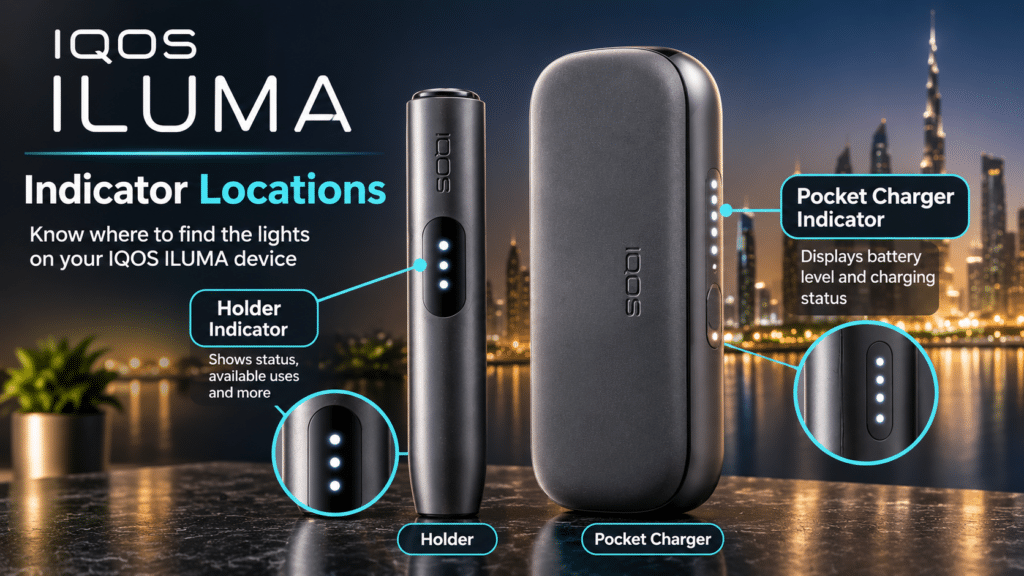
The standard IQOS ILUMA range has two main components: the Holder and the Pocket Charger. Each has its own status indicators, so it is important to identify where a light appears before trying to understand what it means.
The Holder indicators can show how many uses remain available and whether the device is ready for its next operating cycle. The Pocket Charger has a separate light display that shows battery status and theHolder’ss charging status.
Newer models, including IQOS ILUMA i devices, may also have a different display arrangement or additional screen symbols. For that reason, always check the exact instructions against the model name printed on your device or its packaging.

What Do White Lights Mean on IQOS ILUMA?
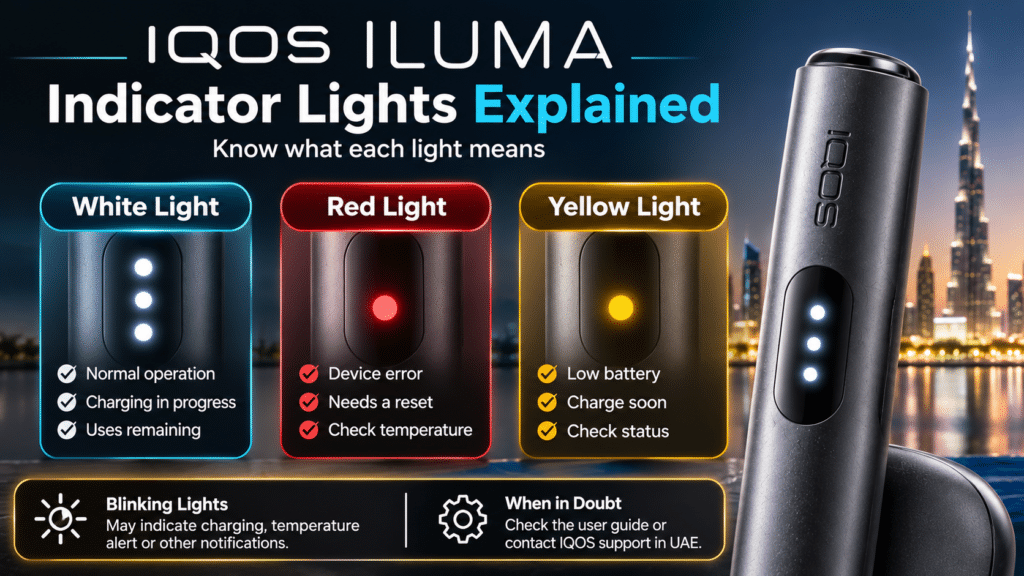
White is one of the main colours used by the IQOS ILUMA status system. In many situations, it indicates ordinary device activity rather than a fault.
Steady white lights
On a standard IQOS ILUMA Holder, one or two illuminated status lights can indicate the number of experiences available. Two lights generally mean that two uses are available, while one light means that one remains.
The Pocket Charger uses its own display. When you place the Holder inside, pulsing white lights can indicate that charging is taking place. The number and position of the lights depend on the component being checked.
Pulsing white lights during operation
During a normal operating cycle, the Holder uses light signals alongside vibration to communicate its status. A slowly pulsing light can indicate that the device is preparing for an experience. Once the readiness signal appears, the device has completed that stage.
Near the end of an operating cycle, the light pattern and vibration can change to indicate that the session is almost finished. These signals are part of the device’s normal feedback system.
Two white flashes
Two white flashes can mean something different from a steady white display. On relevant ILUMA models, two white flashes can indicate that the device is outside its recommended operating temperature range.
This is especially important in the UAE, where outdoor temperatures can get very high. If a device has been left in a parked vehicle, direct sunlight or another hot location, allow it to return naturally to room temperature before checking it again. Do not place it in a refrigerator or directly against an air conditioner to cool it quickly.

What Does a Red Blinking Light Mean?
A red blinking light on an IQOS ILUMA Holder generally indicates the device has encountered an issue. It should not be confused with the normal white charging or status signals.
There can be more than one reason for this warning. The device may need a reset, or a nearby magnet may have affected its operation. A software or firmware issue can also require further checking.
First, check the device’s surroundings.
Before attempting a reset, move the holder away from magnets and magnetic accessories. Avoid placing it directly against magnetic surfaces or equipment while checking the problem.
Next, make sure the Holder is correctly positioned in the Pocket Charger. A poor connection or an incorrectly placed component can make the actual issue harder to identify.
When a reset may be necessary
The reset process differs between models. For some standard IQOS ILUMA devices, the Holder must be placed inside the Pocket Charger before pressing and holding the Pocket Charger button for the specified period. IQOS ILUMA ONE and some ILUMA i models use a different button procedure.
Do not follow a reset instruction intended for another model. Check the relevant UAE user guide first. If the red signal remains after the correct reset procedure, contact IQOS Customer Care rather than repeatedly attempting resets.
What Does a Yellow or Orange Light Indicate?
A yellow or orange blinking signal usually indicates battery status or charging needs, but the exact meaning depends on the device.
On the standard IQOS ILUMA Holder, a blinking yellow light can mean the holder’s battery is depleted and needs to be recharged in the Pocket Charger.
On the IQOS ILUMA ONE, a blinking yellow light at the bottom can indicate a low battery. The official UAE guidance recommends charging the device with the manufacturer-approved power adaptor. The charging time can vary by model and battery condition.
For the newer IQOS ILUMA i range, the Pocket Charger may show a yellow blinking light when the battery is very low. During charging, the display can change as the battery level increases.
If you see a yellow or orange signal, identify the model first and check its battery instructions. Do not assume that every yellow pattern has exactly the same meaning across the entire ILUMA family.
Holder Lights vs Pocket Charger Lights
One common source of confusion is checking the wrong component. The Holder and Pocket Charger don’t use every light pattern the same way.
| Device component | What its lights can communicate |
| Holder | Available uses, operating status, low battery, or an error |
| Pocket Charger | Charger battery level, holder charging status |
| ILUMA i display | Additional device information and model-specific warnings |
| ILUMA ONE light strip | Battery level, temperature warning or device error |
For example, two illuminated Holder lights can indicate that two uses are available. However, four white lights on a compatible Pocket Charger display may represent a battery level rather than the number of uses.
This distinction is useful when checking a device at home, at work, or while travelling around Dubai.
Why Temperature Matters in Dubai and the UAE
Temperature is an important factor for electronic devices. IQOS ILUMA models have a defined operating temperature range; confirm the exact range in the relevant model’s user guide.
For example, IQOS UAE guidance for standard ILUMA devices identifies an operating range of 0°C to 40°C. A temperature warning may appear if the device becomes too hot or too cold.
In Dubai, Abu Dhabi, Sharjah, and other UAE cities, a device can be exposed to high temperatures inside a parked car or near a sunny window. Even if the outdoor temperature seems manageable, the temperature inside a closed vehicle can rise considerably.
If a temperature warning appears:
- Stop using the device and move it away from direct sunlight.
- Place it in a normal indoor environment.
- Allow it to return naturally to its operating temperature.
- Check the indicator again after waiting.
- If the warning remains, consult the model-specific support guide.
Never use a refrigerator, freezer, hair dryer, or another direct heating or cooling source to change the device temperature quickly.
What to Check When IQOS ILUMA Lights Behave Unexpectedly

If an indicator does not match the normal patterns described above, take a moment to check the basics before assuming that the device is damaged.
- Identify the exact model
Check whether the device is an IQOS ILUMA, ILUMA PRIME, ILUMA ONE, ILUMA i, or ILUMA i ONE. Their buttons, displays, and reset instructions are not identical.
- Check the battery
A low battery can affect normal operation. Use the device’s status button or display to check the charge level.
- Check the Holder position
If you are using a model with a separate Pocket Charger, make sure the Holder is placed correctly inside it.
- Consider temperature exposure
Consider whether the device has been left in a hot car, direct sunlight, or an unusually cold environment.
- Follow the correct reset instructions. tions
Only use the reset procedure provided for your exact model. If the problem continues, use the official diagnostic service or contact customer support.
When Should You Contact IQOS Support in the UAE?
Don’t ignore a persistent red blinking light, repeated temperature warning, or display error. If the recommended steps don’t resolve the issue, you may need further diagnosis.
IQOS UAE provides online support and model-specific diagnostic information. Its official diagnostic tools can help identify the issue and explain the next steps. You can also contact its UAE Customer Care team through the official support website.
If the device appears damaged, becomes unusually hot, or shows signs of battery damage, stop using it and seek professional assistance. Do not attempt to open the device or repair its internal components yourself.
Frequently Asked Questions
Why is my IQOS ILUMA blinking red in Dubai?
A blinking red light generally indicates a device issue. Possible causes include needing a reset, magnetic interference, or a software issue. Follow the reset instructions for your exact model. If the warning remains, contact IQOS UAE support.
What does a white light mean on an IQOS ILUMA Holder?
White lights can indicate available uses, normal operation, or charging status, depending on the location and pattern. A steady light and two quick flashes do not necessarily mean the same thing.
Why does my IQOS ILUMA blink yellow?
A yellow blinking signal commonly indicates a low or depleted battery on relevant ILUMA models. Hold the Holder in its Pocket Charger or charge the device according to the instructions for that model.
Can Dubai’s hot weather affect IQOS ILUMA indicator lights?
Yes. Exposure to temperatures outside the device’s operating range can trigger a temperature warning. Avoid leaving the device in a parked vehicle or direct sunlight, and allow it to return naturally to a suitable indoor temperature.
How do I reset an IQOS ILUMA device?
The procedure depends on the model. Standard ILUMA devices with a separate Pocket Charger and ILUMA ONE models do not necessarily use the same reset steps. Always follow the official instructions for your particular device.
Where can I find official IQOS ILUMA troubleshooting information in the UAE?
Visit the official IQOS UAE support section. You can find model-specific guides, diagnostic tools, and contact information there. If a warning continues after the recommended checks, request assistance from the official support team.
Important Information for UAE Readers
IQOS products are not risk-free and contain nicotine, which is addictive. This article is intended only to explain device indicators and basic troubleshooting; it is not a recommendation to use tobacco or nicotine products. These products should only be used by adults who meet the applicable legal age requirements. Always follow UAE laws and the manufacturer’s safety instructions.