Fast 1-Hour Delivery Across Dubai, Sharjah, Ajman
Delivered Within 12 Hours UAE-Wide
Free Shipping on AED 400+ Orders
Fast 1-Hour Delivery Across Dubai, Sharjah, Ajman
Delivered Within 12 Hours UAE-Wide
Free Shipping on AED 400+ Orders

How to Properly Charge Your IQOS ILUMA Device: A Comprehensive Guide


How to Properly Charge Your IQOS ILUMA Device: A Comprehensive Guide
Knowing how to correctly charge your IQOS ILUMA device will help you use it more conveniently and make it easier to interpret its charging indicators. Whether you use the IQOS ILUMA, ILUMA PRIME, ILUMA ONE, or the ILUMA i model, following the proper charging instructions is essential for daily use.
Although the charging process is largely similar across these devices, there may be variations in charging cases, indicators, and operational methods depending on the specific model. This guide covers how to charge your IQOS ILUMA device, how to interpret the charging lights, how to identify common charging-related issues, and how to properly care for the battery.
Understanding IQOS ILUMA Charging
IQOS ILUMA devices utilize rechargeable batteries to power their heating systems. Depending on the model, the device may consist of a holder and a separate pocket charger, or it may feature an integrated design.
For instance, the IQOS ILUMA and ILUMA PRIME models include a pocket charger used to repeatedly charge the holder. In contrast, the IQOS ILUMA ONE features an integrated design, where the device itself is connected directly to the charger.
The IQOS ILUMA i series also offers various designs and features. Therefore, always refer to the instructions specific to your particular model before charging.
Step-by-Step Guide to Charging Your IQOS ILUMA
Follow the simple steps below to charge your IQOS ILUMA device.
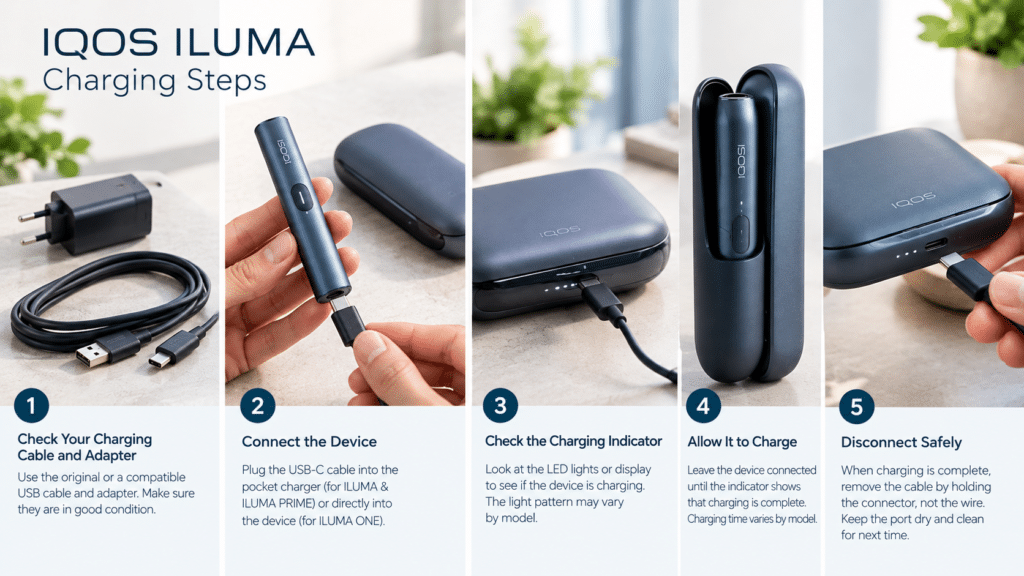

1. Check the Charging Cable and Adapter
Use the USB charging cable provided with your device, and follow the manufacturer’s recommendations regarding the power adapter.
Before connecting, carefully inspect both the cable and the adapter. Do not use any damaged cables, loose connectors, or equipment that tends to become excessively hot during use. Using an unsuitable power source or damaged charging accessories can lead to charging-related issues.
2. Connect the pocket charger or device
For IQOS ILUMA and ILUMA PRIME, connect the charging cable to the USB port on the pocket charger.
For IQOS ILUMA ONE, connect the charging cable directly to the device’s charging port.
If you have a model from the IQOS ILUMA i series, please refer to the instructions specific to your model to identify the correct charging connection. Ensure that the cable is seated properly in the connector without applying any force.
3. Check the charging indicator
Once the charger is connected, observe the indicator lights or the display on the device.
These indicators will help you determine whether the battery is currently charging or if it is fully charged. Their appearance and meaning may vary depending on the model.
If no indicator is visible, verify that the cable is connected correctly and that the power source is functioning properly.
4. Allow the battery to charge
Keep the device connected until the charging indicator signals that the charging process is complete.
The time required for charging depends on the device model, the condition of the battery, the remaining charge level, and the power source. Do not assume that all IQOS ILUMA devices require the same amount of time to charge.
Consult the official user guide for your device to learn about the specific charging duration.
5. Disconnect the charger safely
Once charging is complete, carefully disconnect the cable by holding the connector—do not pull on the cable itself.
Before charging the device again in the future, ensure that the charging port is dry and free from any visible dirt or debris.
How Long Does IQOS ILUMA Take to Charge?
The charging time varies across the IQOS ILUMA range. It can also depend on whether you are charging the pocket charger or the integrated device.
| Device | Charging Design | Important Note |
| IQOS ILUMA | Separate pocket charger and holder | The holder and pocket charger have separate charging requirements. |
| IQOS ILUMA PRIME | Separate pocket charger and holder | Check the pocket charger’s indicator to monitor its battery level. |
| IQOS ILUMA ONE | Integrated device | Charge the device directly through its charging port. |
| IQOS ILUMA i | Depends on the model | Follow the charging instructions supplied with the specific version. |
Do not assume that the charging time will be the same for every model. The time required for charging may vary based on the condition of the battery, the charging equipment used, and the remaining charge level in the battery.
Please refer to the official IQOS user guide to determine the expected charging time for your specific model.
What do the charging lights on the IQOS ILUMA mean?
The charging indicator lights provide essential information about the status of your device’s battery. However, the specific meaning of each light may vary depending on the model.
When observing your device, keep the following points in mind:
Charging indicator: A light or display may indicate that the battery is currently charging.
Full-charge indicator: Once the battery has reached the desired charge level, the device may display a signal indicating that charging is complete.
Flashing lights: Depending on the model and the specific flashing pattern, this could indicate the current charging status or point to a potential issue.
No lights: If no lights appear, check the power source, the cable, the connectors, and the device’s instructions.
A light turning on or flashing does not necessarily indicate a malfunction. Therefore, before taking any action, please consult the official indicator guide for your specific IQOS ILUMA model.
Why is my IQOS ILUMA not charging?

If your IQOS ILUMA device is not charging as expected, there could be several reasons:
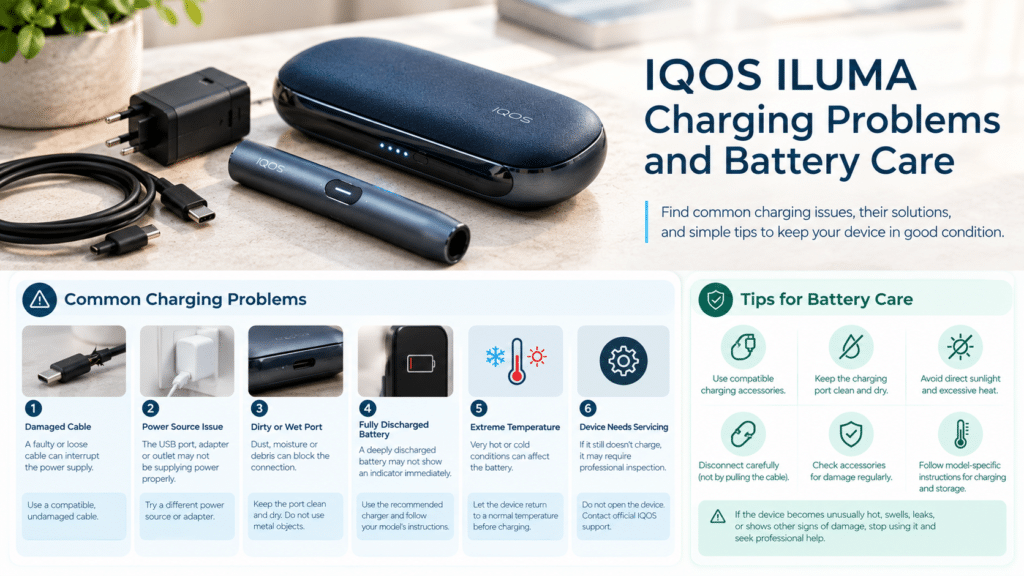
1. Damaged charging cable
A damaged cable or a loose connector can disrupt the power supply. Inspect the cable and, if necessary, try using a different, functional, and compatible charging cable.
2. Issues with the Power Source
The USB port, wall adapter, or power outlet may not be supplying power correctly.
Try using an alternative power source that meets the manufacturer’s recommendations.
3. Check the Charging Port
Dust, moisture, or visible damage around the charging port can interfere with the connection.
Disconnect the device before inspecting the port. Keep the port dry, and do not insert any metal objects or other tools into it.
4. Battery Completely Discharged
If the battery is fully discharged, you may not see any indication immediately upon connecting it to a power source.
Use the charging equipment recommended by the manufacturer and follow the specific instructions for your model. If the device still does not respond, contact official IQOS support.
5. Device Overheating or Overcooling
Battery-operated electronic devices function within a specific temperature range. If the device has been exposed to extreme heat or cold, allow it to return to a normal, suitable temperature before attempting to charge it.
Do not use a refrigerator, heater, or direct sunlight to rapidly change the device’s temperature.
6. Battery or Device May Require Servicing
If the device fails to charge even after checking the cable and power source, it may need to be inspected by a professional.
Do not attempt to open the device or replace the internal battery yourself.
Tips for Maintaining Your IQOS ILUMA Battery
Good charging habits can help you maintain your device and reduce avoidable charging problems.
- Use compatible charging accessories recommended by the manufacturer.
- Keep the charging port clean and dry.
- Avoid exposing the device to direct sunlight or excessive heat.
- Disconnect the charger carefully rather than pulling on the cable.
- Inspect charging accessories regularly for signs of damage.
- Follow the model-specific instructions for charging and storage.
- Stop using the device if it becomes unusually hot, swells, leaks, or shows other signs of battery damage.
You do not need to drain the battery completely before every charge deliberately. Follow the manufacturer’s guidance instead of relying on outdated battery advice.
If the device becomes unusually hot or appears physically damaged, disconnect it from power if it is safe to do so and stop using it.

Can You Use IQOS ILUMA While It Is Charging?
Charging and operating requirements differ between models. Do not assume that every IQOS ILUMA device can be used while connected to a charger.
Follow the instructions for your specific device and avoid using it in any way that conflicts with the manufacturer’s safety guidance.
For models with a separate pocket charger and holder, the holder’s operating status and the pocket charger’s battery status are different things. A fully charged pocket charger does not necessarily mean the holder is ready for immediate use.
How to Choose the Right IQOS ILUMA Device
Understanding the charging design is one factor to consider when comparing IQOS ILUMA devices.
The IQOS ILUMA ONE has an integrated design, while the IQOS ILUMA and ILUMA PRIME use a separate pocket charger and holder. Models in the IQOS ILUMA i range may offer additional features depending on the version.
Before choosing a device, check its design, charging requirements, compatibility, included accessories, and official product specifications.
You can explore the available options in the IQOS devices category at IQOSZone., then review the individual product details before making a decision.
Frequently Asked Questions
How long does it take to charge an IQOS ILUMA device?
Charging time depends on the device model, battery condition, power source, and the remaining charge level. Please refer to the official user guide for the specific charging time for your device.
Why are the charging lights on my IQOS ILUMA not turning on?
This could be due to a disconnected cable, a faulty power source, or an issue with the device itself. Check the connections and ensure you are using charging accessories compatible with your device. If the problem persists, please contact official IQOS support.
Can I leave my IQOS ILUMA charging overnight?
Follow the charging and storage instructions provided for your specific device model. Do not leave a damaged device or faulty charging equipment connected to a power source unattended.
Can I use any USB cable to charge my IQOS ILUMA?
Use the cable provided with the device or a compatible cable that meets the manufacturer’s specifications. Do not use damaged or unsuitable charging equipment.
What should I do if my IQOS ILUMA gets hot while charging?
If it is safe to do so, disconnect the device from the power source and stop using it if it becomes unusually hot. Place the device in a safe location and allow it to cool down naturally. If the overheating issue persists or if the device appears damaged, please contact official IQOS support.